Four from the walkthrough
The Showami walkthrough ended with a twelve-item backlog. Four of them are live now: the empty page an agent hits when nothing is nearby, the course Showami charges a Thinkific subscription for, the MLS board on a showing, and the counter-proposal Mike liked most on the whole recording. This is what they do and what changed in the app.
The page that used to stop
Mike spent about a minute on Showami looking for work and landed on
There are no showing opportunities available
with nothing else on the screen. No map,
no nearest area, no next step. Ours said much the same thing: a pin icon, a line about
widening your radius, and a button that cleared filters you had not set.
Find Opportunities now measures every job it could offer you against the centre of your search, whether or not it falls inside the radius. When the radius comes up empty it says how far the closest one actually is, names the town, counts what is sitting outside, lists the nearest three with their distances, and puts the radius that would reach them on a single button. Clicking it re-runs the search without a second geocode, because the ZIP has already been resolved.
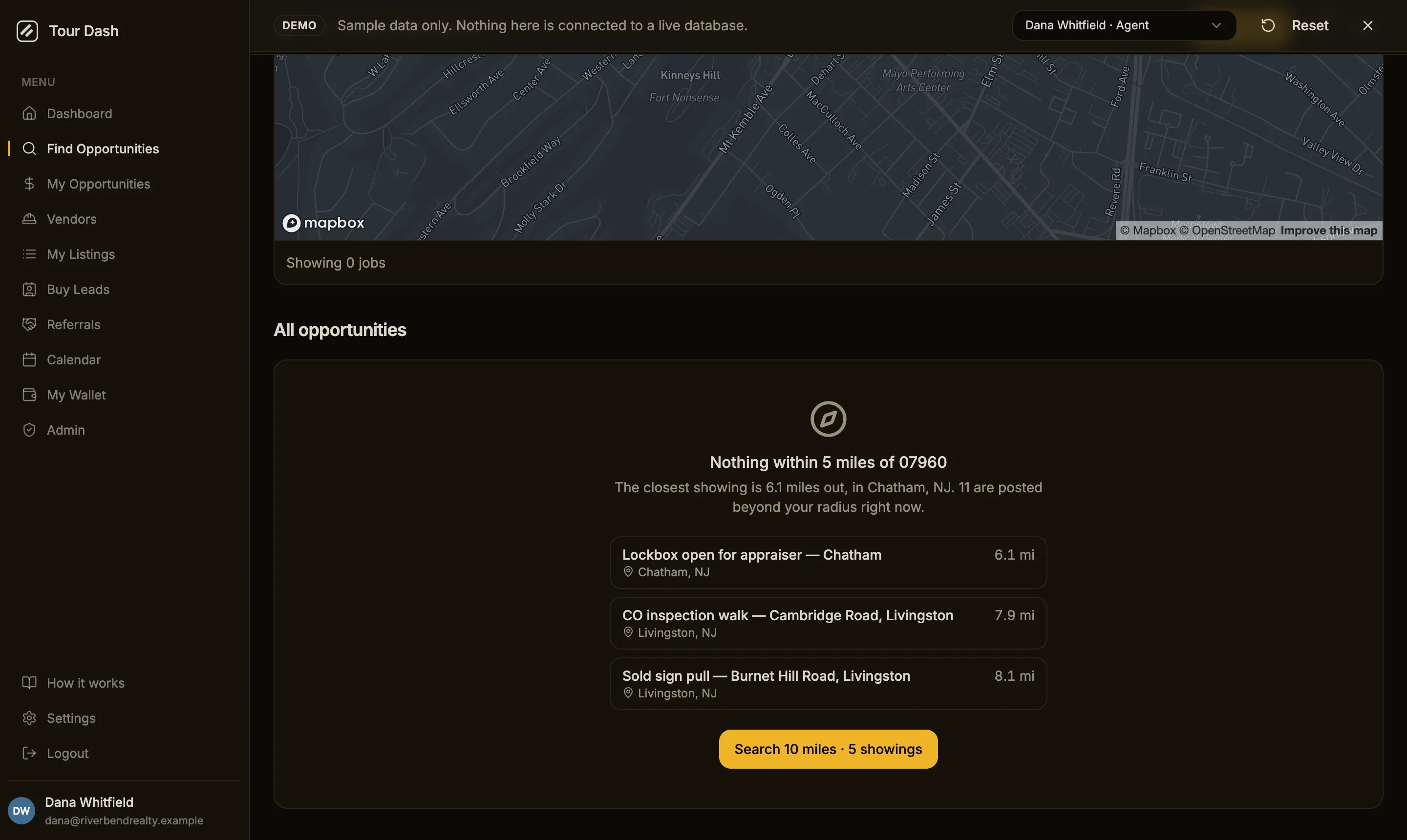
A search term or a service-type chip still gets the old card. That empty page is self-inflicted and the fix is the filter you just set, not a lecture about coverage. The wider set of jobs was already being fetched for other parts of the page, so none of this costs an extra request, and listings without real coordinates are dropped rather than being placed at 0,0 and reported as the nearest thing to a New Jersey ZIP.
The course, as a page
At 11:13 Mike opened Showami's showing-agent course, a Thinkific embed, and sat through the lesson on the minimum you need to accept assignments, show homes and get paid. Tour Dash had nothing like it. It does now, at /how-it-works, in the sidebar footer next to Settings.
It reads differently depending on who is looking. A vendor gets the payout account first, because Stripe's identity check is the thing that stalls a first payment, then trade and service radius, then applying or quoting, then how the money is held and released. An agent gets posting, picking, paying and marking complete. Every step carries the button that takes you to the screen it describes.
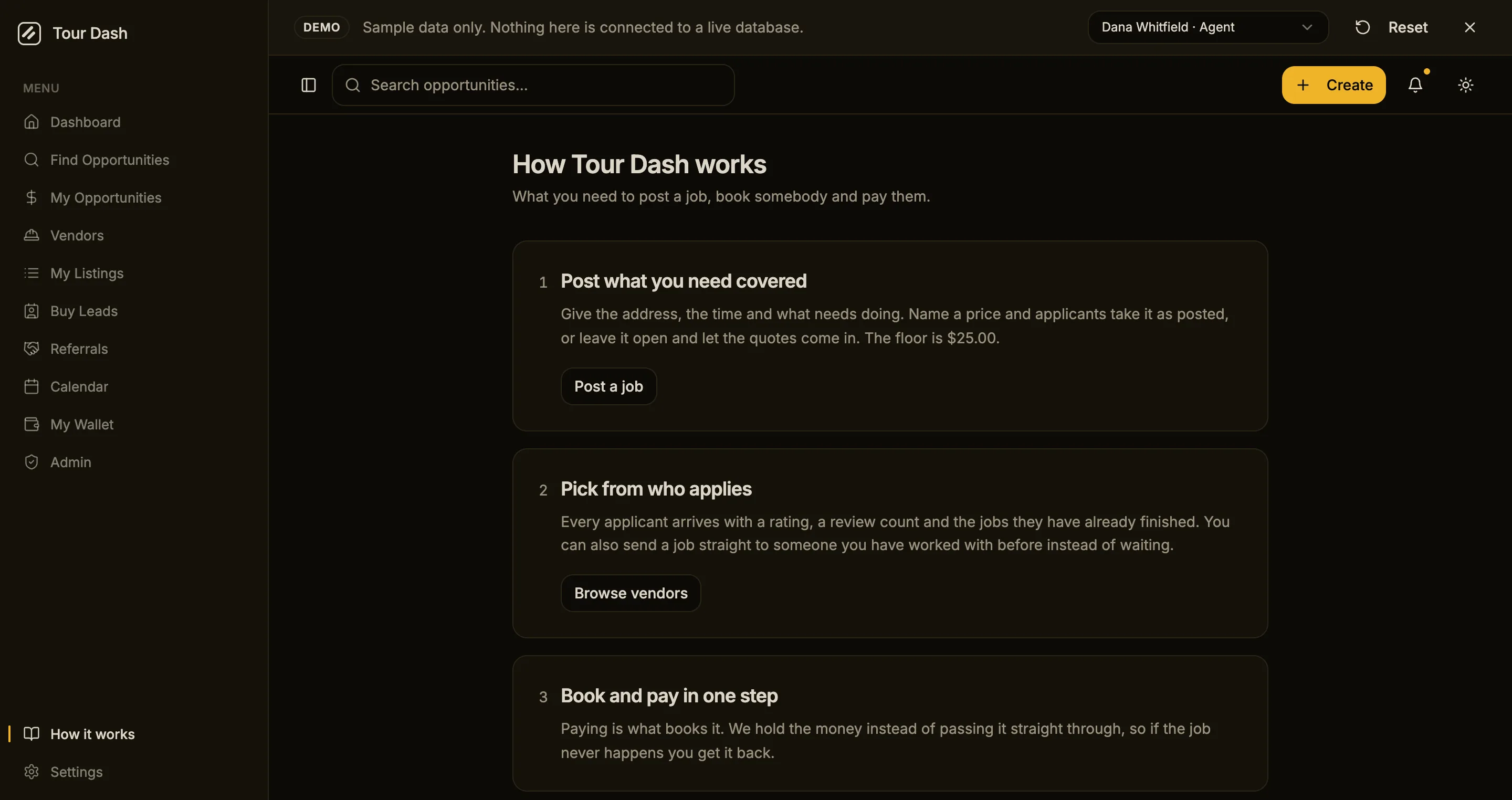
The fee example at the bottom is computed from the same file the Edge Function
charges from, rather than typed into the page. It reads $10.00 on a $50.00 job, which is 20%,
and a vendor paid $40.00. That is Mike's 20%, we would take 10
stated on a page a new
vendor can find, and it cannot drift away from what Stripe actually takes.
Which board, and who can get in
Showami's course opens by telling a new showing agent they need their own MLS
access and a lockbox key before they can accept anything. Mike's note at 12:39 was that the
requirement runs the other way as well: when they're posting a job or a showing, we need to
understand exactly what MLS that showing is going to be part of.
Neither half existed here.
Both do now. An agent names the board when they post, anyone who might cover the job names the boards they can get into and whether they carry a lockbox key, and the two are compared on the card where the decision actually gets made.
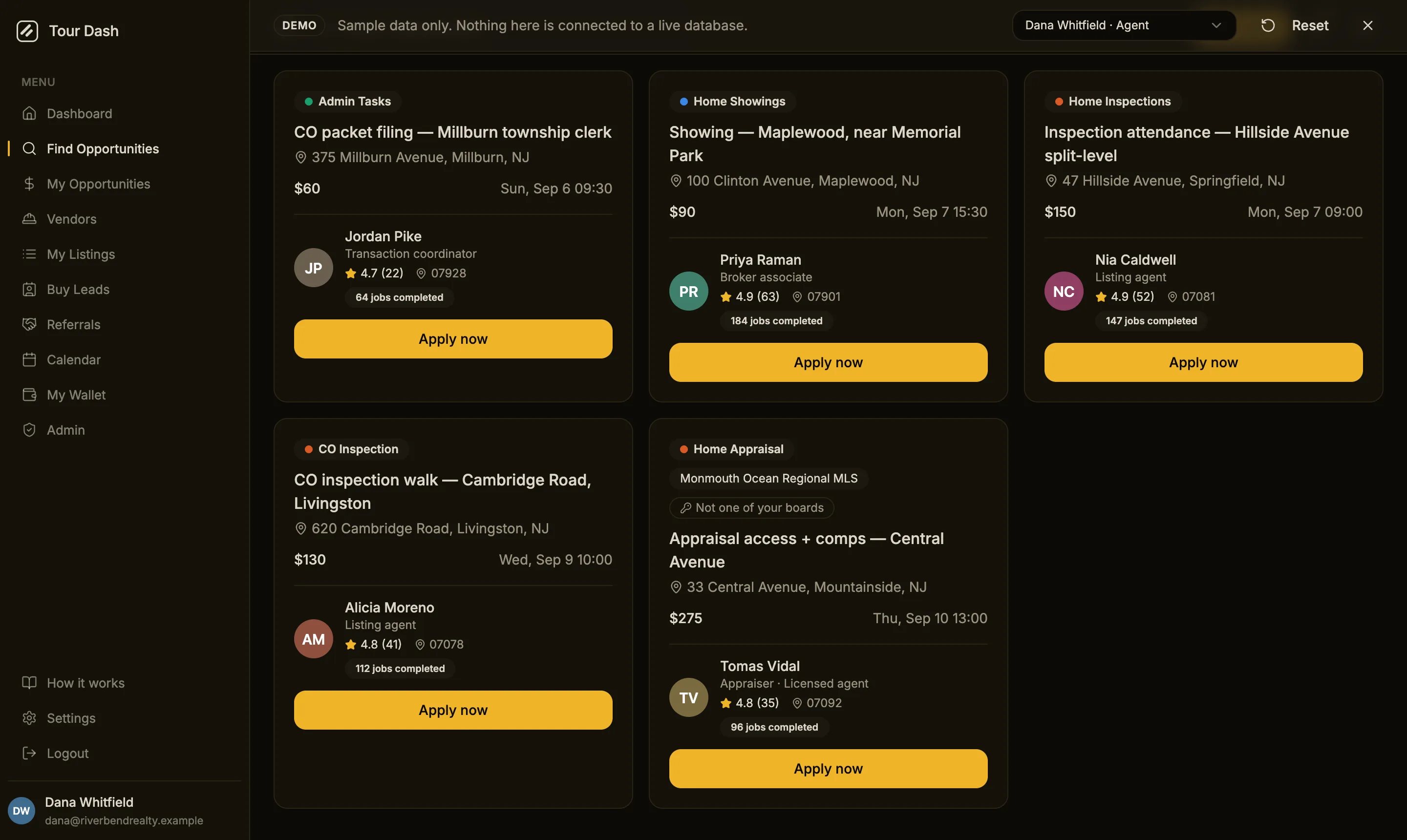
There are three states rather than two, and the difference between them is the whole design. A viewer who has told us their boards and is not in this one gets the badge above. A viewer who has never filled the field in gets a quiet line in the job detail instead, because an empty list is the default every account starts with and most trades never touch. Warning every account about a field they have not filled in yet is how a useful signal turns into noise everybody learns to scroll past.
Nothing is hidden either way. A vendor outside a board can still apply, since plenty of them settle access with the agent directly, and a hard filter would have emptied the board for everyone until the new fields were populated. That is the same dead end section 01 was about, arriving by a different route.
One thing worth recording, because the walkthrough report proposed it the other way: this is not vendor-only. The first cut put the check behind the vendor account type, which excluded the case Mike was actually describing. Agents cover each other's showings, so the board field and the lockbox checkbox sit on every profile.
Name your own price
This was the warmest reaction on the recording. At 17:23, on Showami's version:
This is pretty good, I like this. Submit a counter proposal.
The
pricing teardown had asked for the same thing from
the other direction, because a board where the only available answer is yes, at your
price
quietly loses every job that was posted a little bit wrong.
Applying now opens a dialog rather than firing off an application from a single click, since it is a decision about money. Take the posted price, or name your own. The figures shown are what you would be paid rather than what the agent is charged, because that is the number the person deciding actually cares about.
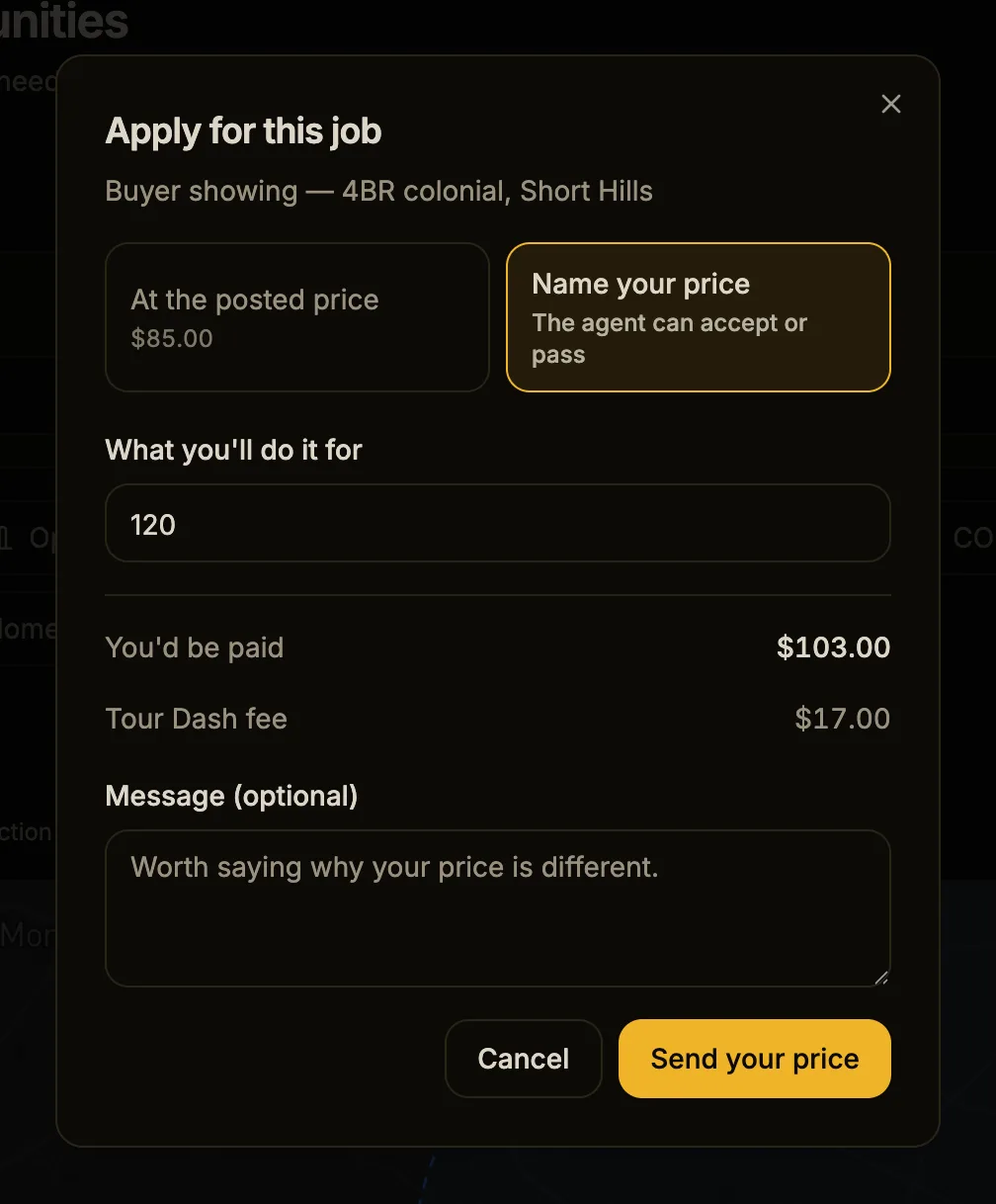
On the agent's side the counter arrives on the application itself, with the gap against the posting spelled out, and the book button carries that applicant's number rather than the listing's.
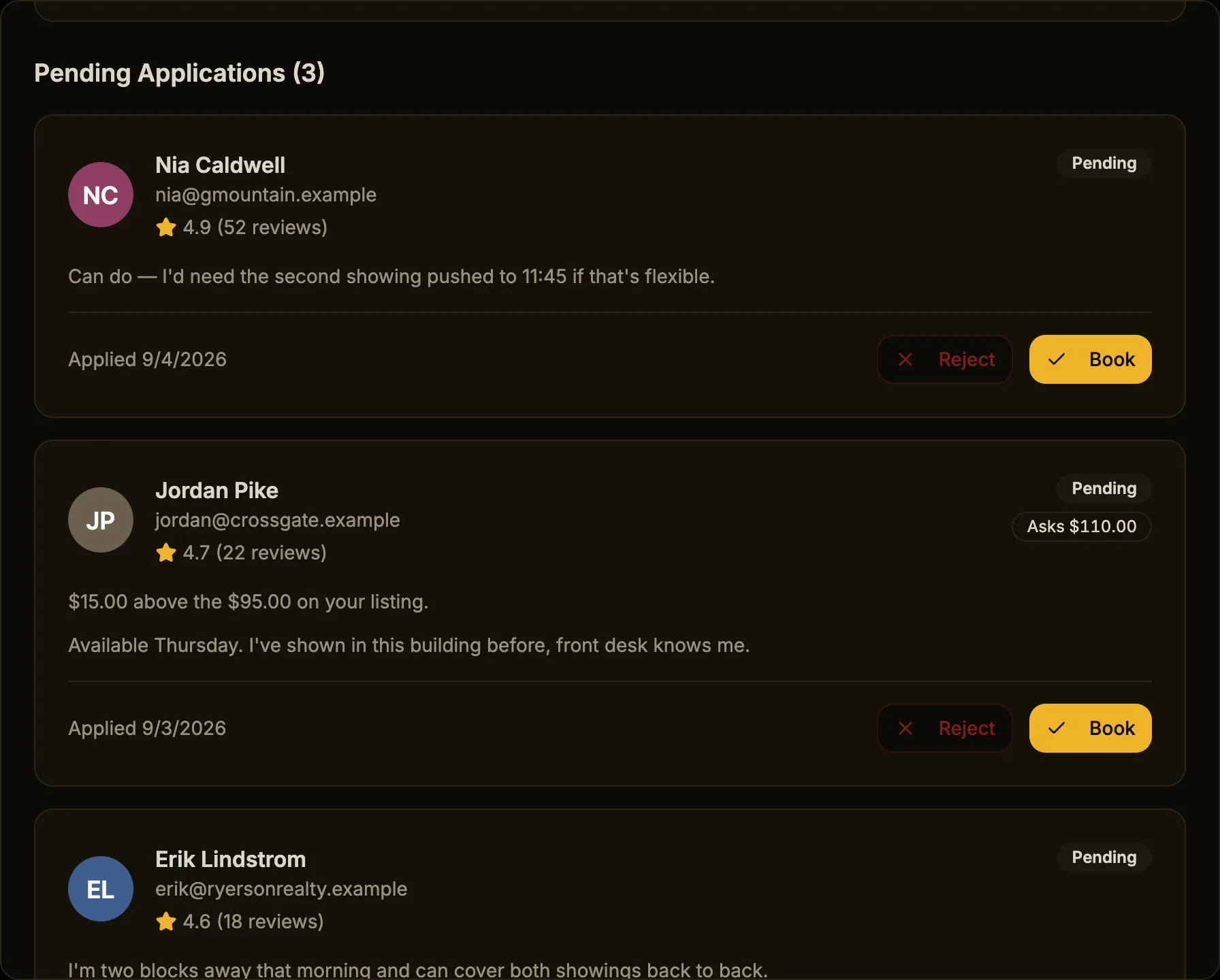
The amount an applicant names is the amount that reaches Stripe. Checkout prices from the application and falls back to the listing, and a database trigger freezes the column after it is written. That last part is load-bearing: applicants have no update permission on their own application, but the agent's existing permission is broad enough to have let the person about to pay rewrite the vendor's asking price downward and then book at it. They now cannot, and neither can anyone else.
Two screens were deriving money from the listing and would have started lying the
moment a counter was accepted. The book button prices per application, and
Mark complete and pay
now reads the payout off the payment record, which was frozen when
the card was charged and is the figure the transfer actually uses.
It also fixes something that was quietly broken. Jobs priced by quote post with no price at all, so checkout had been refusing them for being under the minimum. They were unbookable. Naming a price on the application is what makes them work.
What the rest of the backlog is waiting on
The other ten items were not skipped for being hard. Most of them need something that is not a code change.
| Backlog item | What it is blocked on | Status |
|---|---|---|
| Coverage count on the empty state | Half of it shipped above: an agent now sees how many jobs sit beyond their radius. The landing-page version, twelve vendors cover this ZIP, needs enough real vendors for the number to be worth printing. | Half done |
| Course | Nothing. It is live. | Done |
| Counter-proposal on an application | Migration applied and the checkout function redeployed, 4 September. See section 04. | Done |
| MLS on the showing, access on the profile | Migration applied 4 September, app side with it. See section 03. | Done |
| Invite link with a fee credit | A new table and a rule for when the credit lands. Mike named both a flat $5 to $10 and a fee waiver; picking one is a pricing call. | Needs a decision |
| Text and email on the moments that matter | Resend is wired for the team but never writes to a user. SMS needs a provider account. | Needs a provider |
| Volume pricing | Whether the discount comes off our fee or the vendor's payout. Mike's example was five showings under $45 each. | Needs a pricing call |
| License verification | Already Phase 2. New Jersey's licensee search is the first source. | Roadmap |
| Agent score | Overlaps the reliability score already on the table, so it is one decision rather than two builds. | Roadmap |
| Safety partner | Mike named Forewarn. There is nothing to build until somebody has spoken to them. | Needs a partner |
| ACH for the requesting agent | A switch in Stripe Checkout, not a feature. Venmo and Zelle stay out because the platform cannot hold or refund them. | Needs a decision |
| Light theme as the default | Mike said he was kind of liking the light. It is a one-line change once he says so. | Needs a decision |
What is left divides cleanly. Notifications and the safety partner need an account with somebody else. Volume pricing, the invite credit, ACH and the light theme need a decision from you and Mike rather than a build. Only license verification and the agent score are waiting on engineering time alone.
Sources
- The walkthrough. Showami walkthrough, which has the transcript, the frames and the original twelve-item backlog.
- The fee. How Showami makes money for the ladder the 20% anchor was set against, and Stripe Connect wired in for what the payment actually does.