Statements and receipts
A beta user asked, half joking, whether the wallet could give him something to hand his accountant. It is the kind of request that sounds like a download button and is really a question about bookkeeping: the wallet already knew what happened, it just had no way of saying so on paper. There are now two documents behind it. A statement covering a month or a whole year, printable or exportable as a CSV, and a receipt behind every single line in the ledger. Both were built around the one distinction that matters to an accountant and that the wallet already understood: money you spent is not the same thing as money you moved to your own bank.
What he asked for
One message, and it contains both documents.
Mike! one more thing my CPA will be so proud of me, He kills me every month. under wallet can we download monthly statement🤣 or specific invoice needed.
Two requests, not one, and they answer different questions. The monthly statement is what he hands over at the end of the month so his accountant can see the whole picture at once. The specific invoice is what arrives months later, when the accountant points at one number on a bank feed and asks what it was. A page that only did the first would still leave him digging through the app for the second.
Both documents call themselves receipts and statements rather than invoices, because that is what they are. An invoice asks for money. Every line in the wallet is money that has already moved, or is on its way. Calling a settled charge an invoice would be the kind of small wrongness an accountant notices immediately.
The way in is the wallet
Two doors, because he described two different moments.
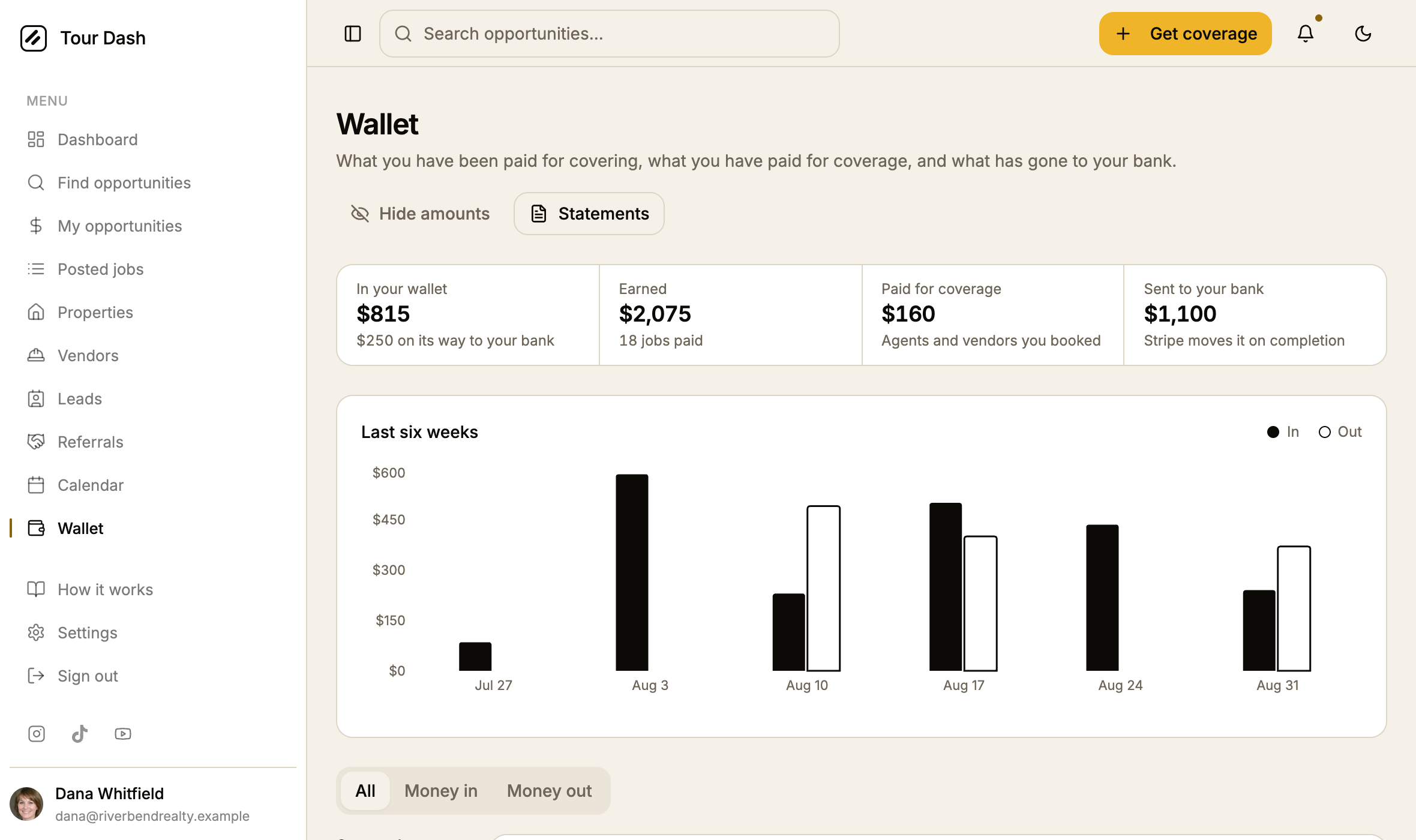
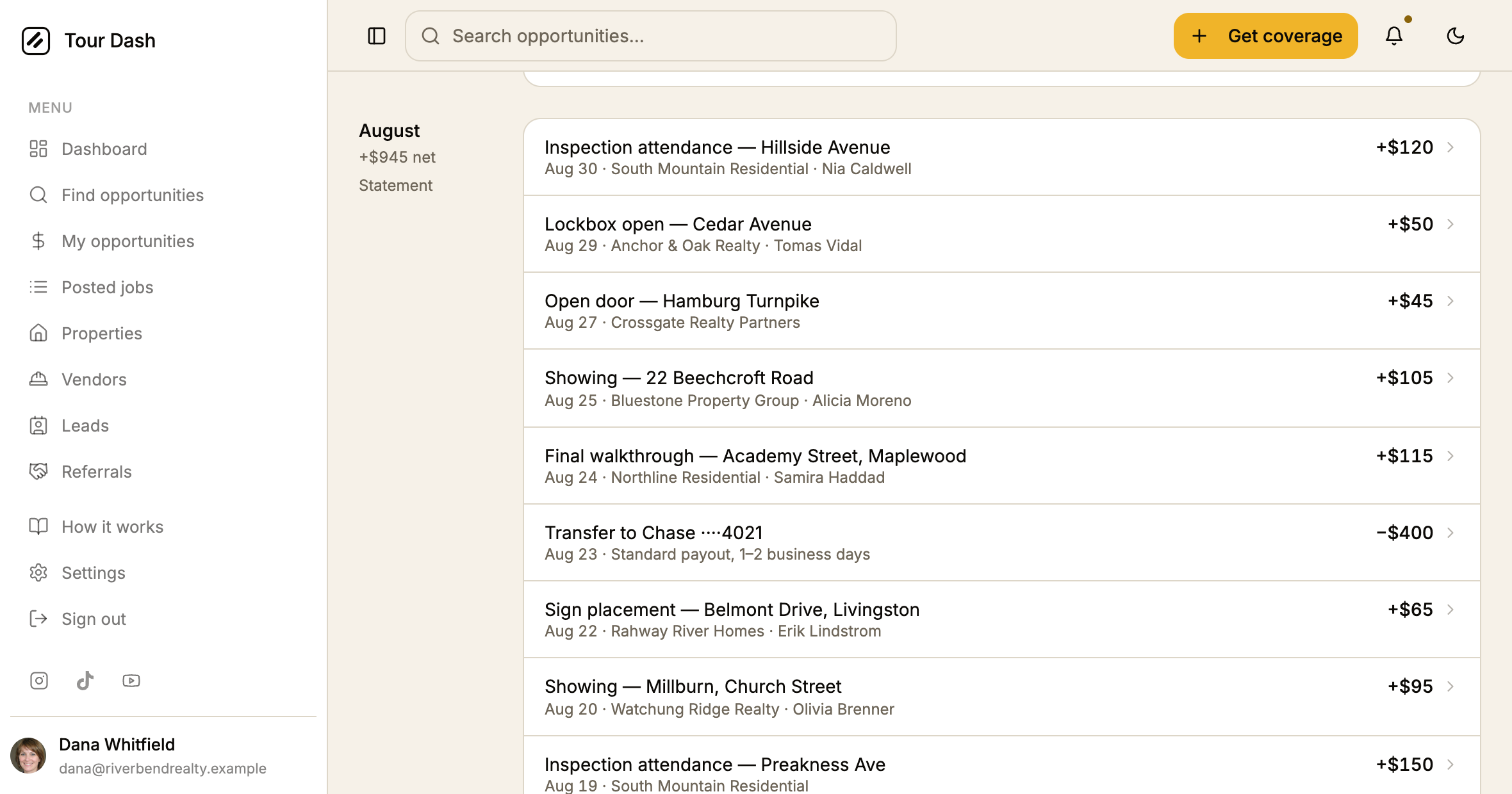
- The whole row is the target, not a hover action. The question about one charge gets asked from a phone as often as a desk, and an action that only appears on hover does not exist on a phone at all.
- Failed lines are linked too. A line that did not go through still has a receipt, and that receipt says no money moved. That is the answer to the question, and it is more useful than a dead row.
The statement
A month, or a year, on a sheet that can be filed.
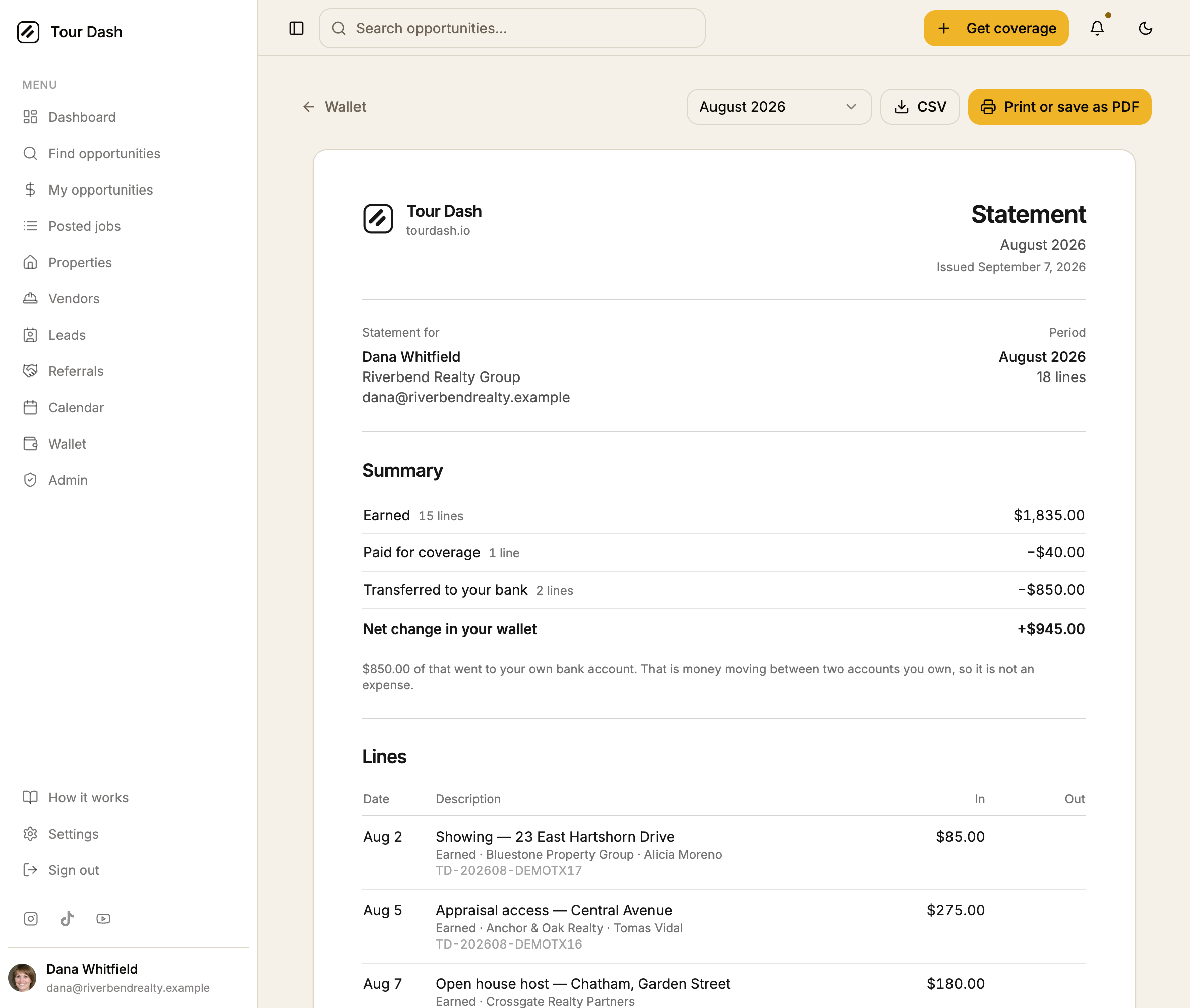
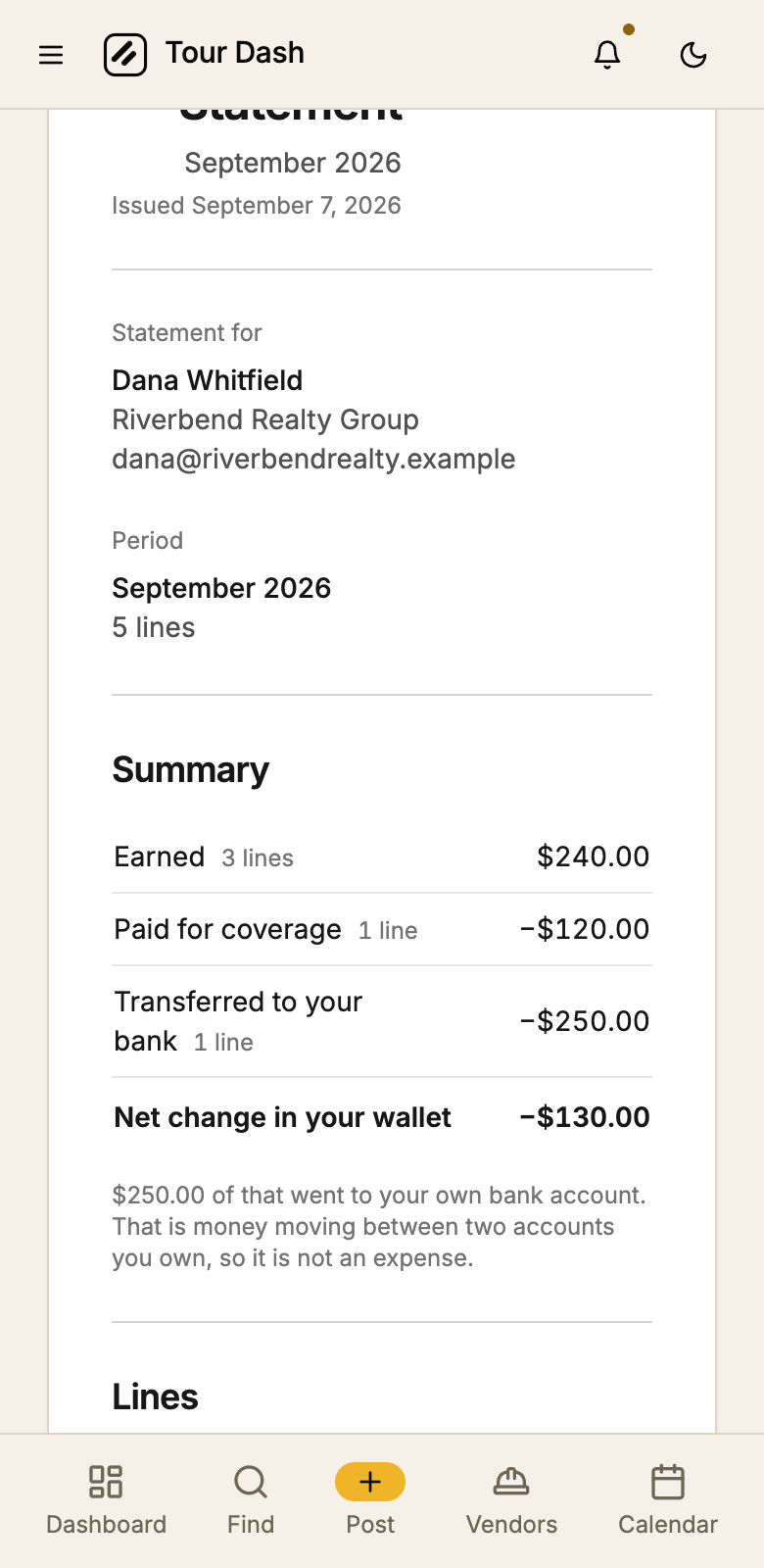
- The summary is five buckets, not two. Earned, refunded, paid for coverage, platform fees, and transferred to your bank. Those last three all look like money leaving if you only count direction, and only two of them are expenses.
- A transfer to your own bank says so in words. Under the summary: that is money moving between two accounts you own, so it is not an expense. It is the single most likely way for a wallet export to overstate a year of costs, and it is worth a sentence.
- Every period the ledger has, and every year as well. The picker offers each month that has something in it, and an "All of 2026" beneath them. The whole-year version is the one nobody wants to assemble out of twelve downloads in April.
- Pending and failed lines are listed and counted separately. Pending money is real but has not settled; failed lines moved nothing at all and appear only so the line count reconciles against a bank feed. Neither is folded into a total.
- A reference on every line.
TD-202608-DEMOTX17, derived from the line itself rather than counted, so the same charge carries the same reference on the statement, on its own receipt, and in a CSV downloaded six months later.
The CSV is the other half of the same document. Eight columns: date, reference, category, description, counterparty, money in, money out, status. Two amount columns rather than one signed one, because that is the shape bookkeeping software imports without argument, and a category column so a transfer to your own bank can be filtered out of the expenses in one click.
The receipt
One line, on its own sheet, for the question that arrives out of order.
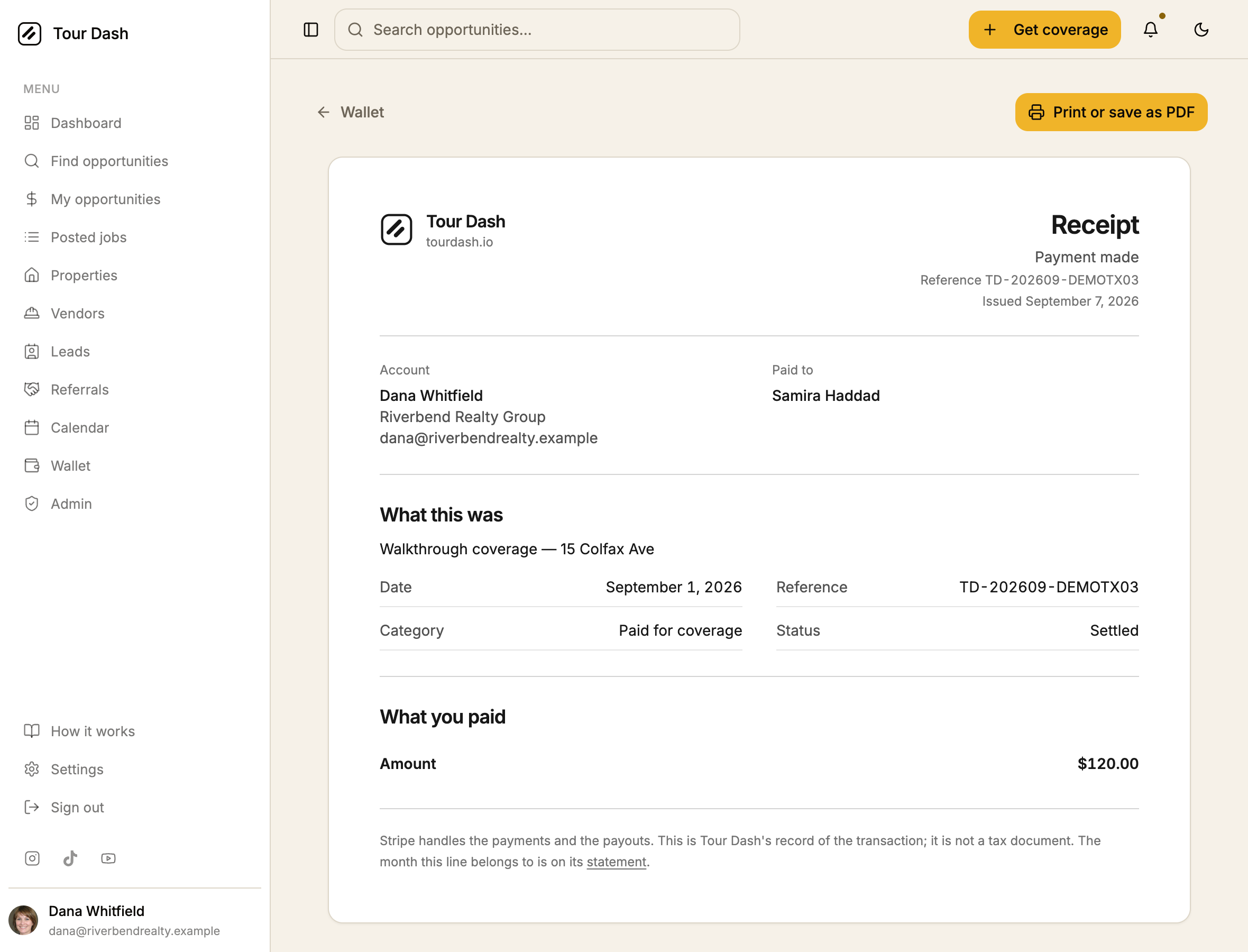
- Where a booking's payment record is readable, the total splits. Job total, their share, and the Tour Dash service fee, with the amount actually charged to the card at the bottom. Those are three different lines in a set of books, and only the first is on the ledger row.
- The document adapts to which side you were on. An agent who paid sees what was charged; a vendor who was paid sees the fee taken out and what landed. Same line, two honest readings of it.
- A transfer to your own bank has no counterparty and does not pretend to. The heading is "What moved", not "What you paid", and the space where a name would go is left empty rather than filled with the transfer's timing note.
Printing
The part that decides whether any of this is usable.
- The sheet is drawn in black on white, not in the theme. A statement is not a surface of the product, it is a thing you hand to someone else. One that arrives at an accountant in dark mode with an amber rule down the side is one you get asked to send again.
- The page margin is zero, and the sheet carries its own. Chrome draws its URL, the
date and the page numbers into the page margin box. With no margin there is nowhere to draw
them, so nothing says
localhost:8080across the top of the statement. - The app around it disappears. Sidebar, header, bottom bar, the demo banner, the buttons that produced the document: all marked not to print. Nothing else on the page moves to achieve it.
- Rows do not split across a page break, and the column header repeats. A two-page August statement reads as two pages of the same table rather than a table and an orphan.
How it was checked
- The totals reconcile against the wallet. The all-of-2026 statement reads $2,075.00 earned, $160.00 paid for coverage, $1,100.00 to the bank and $815.00 net. Those are the same four figures the wallet shows in its rail, arrived at by a separate path.
- Both documents were rendered to real PDFs through Chrome's own print pipeline, not judged from a screenshot of the screen version. That is how the demo banner, the page-margin header and the paper-coloured band under a short document were each found.
- Every route was driven, including the broken one. The statement with no period, with a month, with a year, a receipt for an earning, a payment, a pending transfer, and a receipt id that does not exist. No console errors on any of them.
- Demo isolation holds. The new pages make no request to Supabase on
/demo. The payment lookup that enriches a receipt returns empty there rather than reaching for the network. - The CSV was read back out of the browser rather than assumed, by intercepting the blob the download hands over.
What is left
- Deployed. Live as of 7 September. The property hub migration in the same tree was
confirmed applied to production first (the tables, the address-key function, the
listings.property_idcolumn and all eight policies), because posting a job now resolves its property and the build would have failed at the last step without them. - No business address on the document. A receipt normally carries the issuer's registered address, and Tour Dash's is not recorded anywhere in the codebase. Rather than invent one, the header carries the name and the domain. Worth adding once somebody can supply it.
- The fee split only appears where a payment record exists. Older ledger lines written before payments were recorded show a single amount, which is accurate but less useful. Nothing is fabricated to fill the gap.
- Nothing is emailed or scheduled. He asked to download a statement, and that is what this does. A monthly email that arrives on its own is a reasonable next ask, and a different piece of work.