Emergencies, Proof and Quotes
A second batch of feedback from the same beta user, four asks this time. One of them was a naming complaint, and she was right in a way that turned out to be measurable. Our own demo data had made the exact mistake her message described. That one shipped today. The other three are real features, and they are not equal: one is mostly built already and needs a last mile, one needs a table and an upload, and one needs a decision made before anybody writes code. This is what each actually costs, and what we would want to ask her at the mock trial.
The four asks
Her words, because the detail in them keeps deciding how each one gets built.
🚨 Need Someone ASAP option I’ve had so many emergencies the day before or day of closing! Maybe alert nearby vendors who are available for same day emergencies?
Will there be an area for photos and proof of completion? If I pay someone I want them to be able to upload a photo when completed?
Option to Request quotes from 3 vendors at once being able to send the job to a few vendors and compare options. Then I can send my seller the top 3 cleaners/handymen/movers, and they can choose and potentially pay directly through the app?
I would change “Pick Up Placement” it confused me at first I would make it clearer with 2 options Sign Installation and Sign Removal
| Ask | Where it stands | What it needs |
|---|---|---|
| Sign naming | Shipped 8 September | Done. Migration still to run on live. |
| Need someone ASAP | Nothing exists | A decision first, then a table, a trigger and a delivery channel we do not have. |
| Proof of completion | Pieces exist, pointing the wrong way | A vendor-side upload and a bucket. The smallest of the three. |
| Quotes from three vendors | Most of it is built | Her half is done. The seller’s half does not exist at all. |
Sign work is two jobs Shipped
The quickest of the four, and the one with evidence behind it that we did not expect to find.
“Pick up placement” was trying to name both halves of sign work in one label and ended up naming neither. Read it cold and it can mean pulling a sign, putting one in, or accepting a placement — which is roughly the set of things she said it might mean.
What settles it is that we made the same mistake ourselves. The demo fixture
demo-l-203 is a sign placement job, “Sign placement — Farbrook
Drive”, filed under the sign-pickup type, whose description reads “pull
the sign from the yard once it has sold or expired.” Somebody writing our own sample data
hit the ambiguity and guessed wrong. A label our own team misreads is a broken label rather
than a matter of taste.
So the picker now offers the two options she named. sign-pickup keeps its id,
because live listings carry it in service_type and renaming ids breaks rows,
and is retitled Sign removal. Sign installation is a new type above it, with
one extra field, where the sign goes, because that is the thing you have to tell
somebody putting one in and never have to tell somebody taking one out.
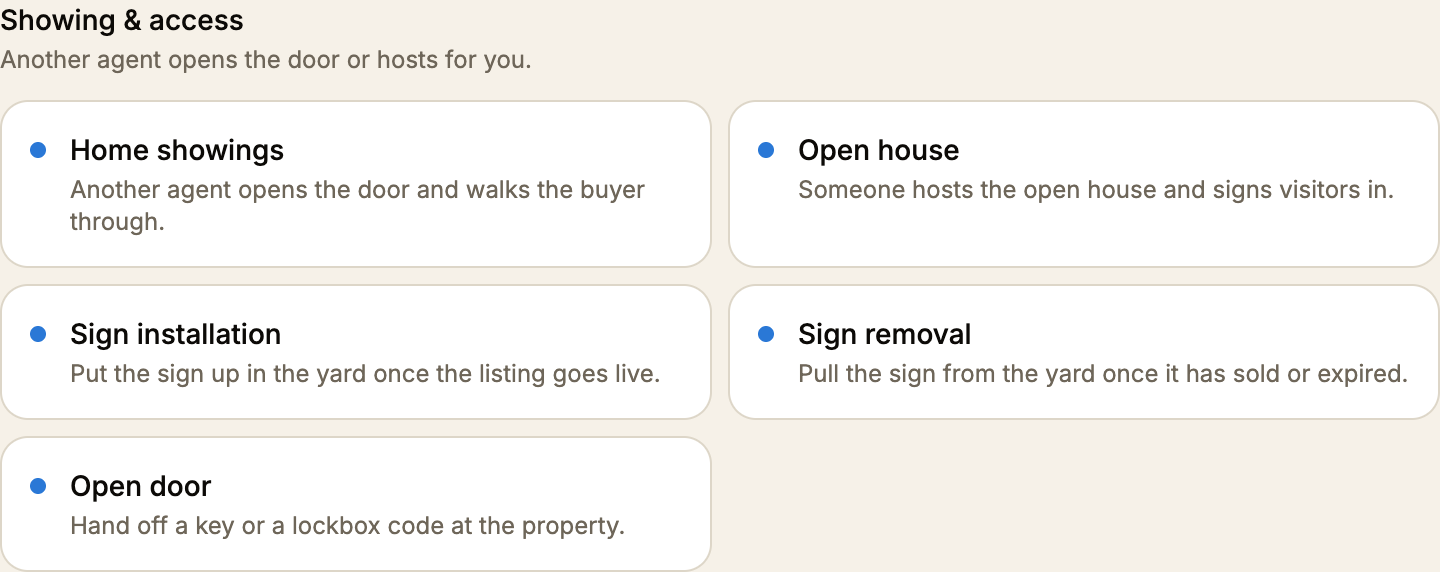
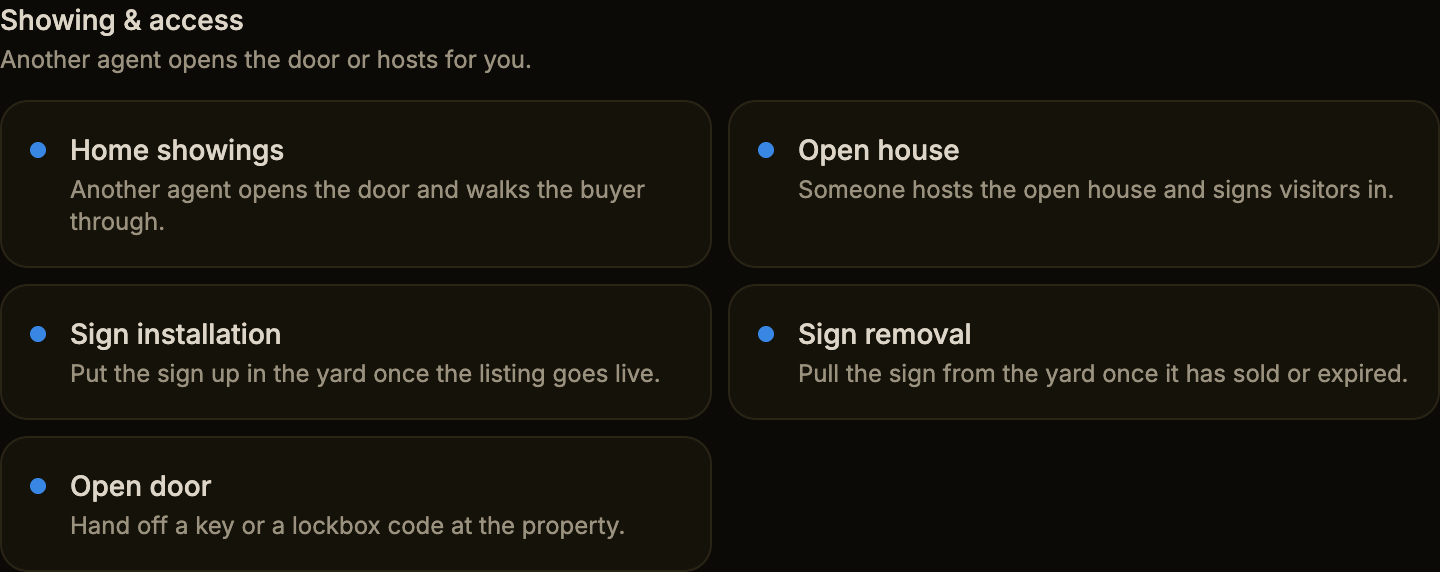
Both stay on the coverage board rather than folding into the sign-service
vendor trade. That trade is the professional version, with a truck, an auger and brokerage panel
stock, and a vendor only ever sees jobs in their own trade. These two are errands another
agent runs on the way past, which is what the coverage board is for. An agent who wants the
professional takes the “Hire a vendor instead” door at the bottom of the same page.
- One thing left.
listings.titleis written at creation, so a job posted before today keeps the string “Pick up placement” in its own title column.supabase/sign-service-rename-migration.sqlfixes those rows and has not been run against live yet. - It does not retype old rows. Anything already posted stays a removal. The title
is free text, an agent may have meant either, and moving a row to
sign-installationwould change who is offered it. The split applies from here forward.
Need someone ASAP
The largest of the three, and the only one where the hard part is not code.
Nothing like this exists today. A listing has no urgency of any kind: no rush flag, no priority, nothing that separates “a week Tuesday” from “this afternoon or the closing falls apart.” A vendor finds same-day work the same way they find any work: by opening Find opportunities and looking. Her emergency is precisely the case where that fails, because the whole problem is that she does not have time to wait for somebody to check the app.
The notification triggers we have all fire on things that happen inside a job that already has two parties: an invite sent, an application received, a review left. None of them fire when a job simply appears near somebody who could do it. And every notification we send is an in-app row. We have no push and no SMS, so nothing reaches a phone that is not already open on the app. For an emergency posted at 4pm the day before closing, a row nobody opens is the same as nothing.
So the honest scope is three parts, and the third is the one that decides whether this works at all:
- An urgency flag on the listing, set at posting. Small, and it should also change how the job is drawn everywhere it appears. This is the one place the reserved amber would earn its keep on a board.
- A fan-out on creation. A trigger that finds vendors in the right trade whose service radius covers the address and writes them a notification. The geography and the trade matching already exist for the board; this points them the other way.
- A channel that reaches a phone. We have Resend wired for lead notifications, so email is the short path. Nothing else is built. This is the part with a real cost.
And the design question, which we should put to her rather than guess at. An alert that goes to every plumber within twenty miles will be ignored inside a month, and then the feature is worse than not having it, because she will believe it worked. Who gets woken up? Her preferred vendors first, then widening? Only vendors who have opted into emergency work? Is there a premium on the job, so a vendor dropping their afternoon is paid for it? Her message says “vendors who are available for same day emergencies,” which suggests she already pictures it as a thing a vendor signs up for rather than something pushed at everybody. That is the version to build.
Photos and proof of completion
Every piece this needs already exists, pointing the wrong way.
Tour Dash already uploads pictures against a listing. There is a
pictures column, a listing-pictures bucket and an upload helper.
All of it runs in one direction: the agent attaches photos when posting or editing a
job, showing the vendor what they are walking into. Nothing comes back the other way. A
vendor has no upload surface anywhere in the product.
Which matters most at the exact moment she is describing. Completion today is entirely on the agent’s word: she opens Posted jobs, marks the job complete, and that call releases the vendor’s money through Stripe. The vendor cannot say “here, it is done.” She has nothing to look at before she pays, and he has nothing to point at if she says he did not.
This is the smallest of the three to build and the one most likely to prevent an argument. It needs a bucket a vendor may write to, a few rows joining photos to the appointment, an upload on the vendor’s side of a booked job, and those photos shown on the agent’s completion step so there is something on screen when she releases the money. The payment flow itself does not change.
One question worth asking her: should the photo be required before a vendor gets paid? It is the difference between a nice-to-have and the thing that makes her trust somebody she has not met. It also means a vendor with a dead phone cannot get paid, which is a real cost, so it should be her call and not ours.
Quotes from three vendors
She asked for two things in one message. We built the first one months ago. The second does not exist.
Sending a job to several vendors at once already works, and so does comparing what comes back. In Hire a vendor she can select more than one vendor, which posts the job invite-only and sends it to exactly those people. The app confirms it with “Sent to 3 vendors.” If she posts the job without naming a price, it becomes a quote-first job: the vendors see “Send a quote” instead of “Apply”, and each names their own number.
Those numbers then come back into one dialog, listed together, each shown against hers — “$40 above your $110”, or “Their quote” when she never named one. She books one and the card is charged at that figure. The quoted price is frozen by a database trigger the moment it is named, including against her, so nobody can rewrite the number after the fact.
That is her first sentence, working today. It is worth showing her at the mock trial, because a beta user asking for a feature we shipped is the same signal we got from the preferred vendor list last week: the thing exists, and the route to it does not read like the thing she was looking for. She was in Hire a vendor picking one person. Nothing on that screen says “you can pick three and let them bid.”
Her second sentence is the part that does not exist. “Send my seller the top 3 and they can choose and potentially pay directly through the app” means a person who is not a Tour Dash user seeing a shortlist, picking from it, and paying. There is nothing like that anywhere in the product: no way to share anything with anyone outside the app, no client-facing view, no payment by a third party. Stripe Connect is built around an agent paying a vendor, and a seller paying instead is a different flow with its own questions about who is owed a refund when a job goes wrong.
This is the ask with the most product in it and the least code written. It is also the one that would change what Tour Dash is — from a tool an agent uses to something an agent puts in front of a client. Worth taking seriously for that reason, and worth not starting until we understand it.
What to ask her at the mock trial
Four questions whose answers change what gets built. Cheaper to ask than to guess and rebuild.
- On emergencies: who should get the alert? Everyone in range, or vendors who have opted into same-day work? Should her preferred vendors get it first? Would she pay more for a same-day job, and would she expect to?
- On proof: should the photo block the payout, or just sit alongside it? And is this about trusting the vendor, or about having something to forward to her seller?
- On quotes: show her the invite-and-compare flow that already works and find out whether it is what she meant. If it is, this becomes a discoverability fix rather than a feature, the same shape as the preferred vendor list.
- On the seller: what does the seller actually do today? Do they choose the cleaner, or does she choose and they pay? That answer decides whether this is a sharing feature or a second kind of account, and those are very different products.